Development Practices
Tools-in-Action30min
Gemini CLI in Action
This session demonstrates practical, repeatable workflows using Gemini CLI for codebase querying, editing, and automation. Through live demos, it covers onboarding unfamiliar projects, structured feature development, CI/CD integration, automating tasks, data exploration, and extending capabilities—equipping developers to efficiently apply Gemini CLI in daily software engineering tasks.
talk.summaryAiDisclaimer

Wietse VenemaGoogle
talkDetail.whenAndWhere
Monday, October 6, 18:20-18:50
Room 5
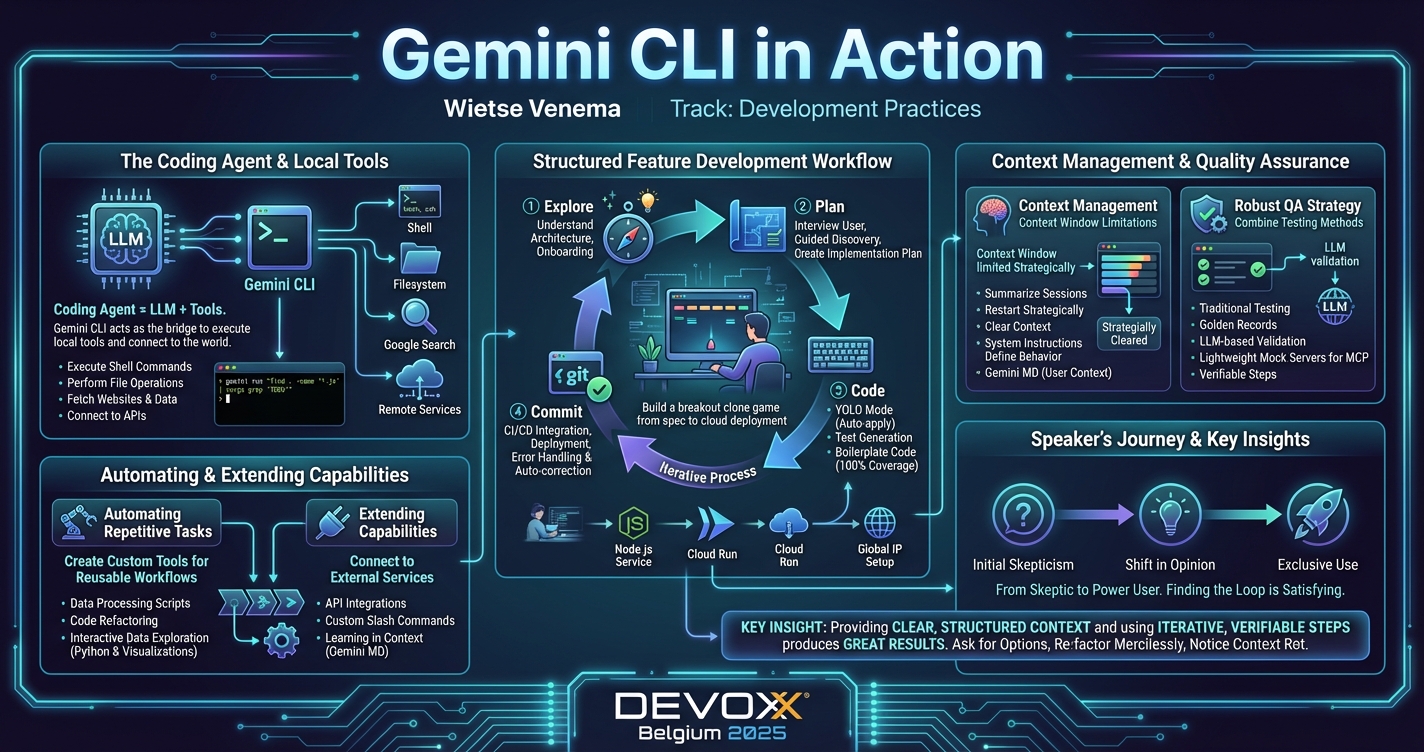
This session takes a practical look at Gemini CLI, a command-line tool for querying and editing codebases of any size. It can use tools like your shell, filesystem, Google Search, and has the ability to fetch websites and connect to remote services.
The focus of this talk is on showing repeatable workflows that developers can apply to their day-to-day work. Expect a sequence of real-world, live demos (I mean what can possibly go wrong). It will not be a walkthrough of the documentation. I’ll cover the following themes:
Attendees will see how providing clear, structured context and using iterative, verifiable steps can produce great results. My goal is for attendees to walk away with a clear understanding of how to apply Gemini CLI to their day-to-day software engineering tasks.
The focus of this talk is on showing repeatable workflows that developers can apply to their day-to-day work. Expect a sequence of real-world, live demos (I mean what can possibly go wrong). It will not be a walkthrough of the documentation. I’ll cover the following themes:
- Codebase Onboarding: How to use the tool to quickly understand the architecture of an unfamiliar project.
- Structured Feature Development: A walkthrough of the "Explore, Plan, Code, Commit" workflow with Gemini CLI.
- CI/CD Integration: How to use Gemini CLI's non-interactive mode in build scripts and pipelines.
- Automating Repetitive Tasks: Creating custom tools for reusable workflows.
- Interactive Data Exploration: A demonstration of generating and executing Python scripts to analyze data and produce visualizations.
- Extending Capabilities: Tools are what makes this tool valuable. I’ll show examples of connecting to external services.
Attendees will see how providing clear, structured context and using iterative, verifiable steps can produce great results. My goal is for attendees to walk away with a clear understanding of how to apply Gemini CLI to their day-to-day software engineering tasks.
Wietse Venema
Wietse Venema is driven by the joy of building things, learning constantly, teaching what he knows, and writing about it all. This passion led him to author the O'Reilly book on Cloud Run, after which he joined the product's team at Google to put that cycle into practice every day.
Read his notes on AI agents, cloud infrastructure, and development workflows here: wietsevenema.eu
Read his notes on AI agents, cloud infrastructure, and development workflows here: wietsevenema.eu